![Nomad_Mark_Light_Green-2.png]](https://help.nomadlease.com/hs-fs/hubfs/Nomad_Mark_Light_Green-2.png?height=40&name=Nomad_Mark_Light_Green-2.png)
What changed
Your statement is now built directly from your property's ledger — one record of the rent coming in from your resident and the payment(s) going out to you. Because it's drawn from that full ledger, you'll see more line items and labels than you used to.
What has not changed:
- Your payday is still the 5th for GR and the 10th for GR Waivers.
- Your money still goes to the same bank account.
- Your rent amount and fees are the same.
Common Questions
Why does my statement say “Guaranteed (Month) Rent” instead of “Rent”?
It's the same payment with one of two labels. “Rent” means your resident paid on time. “Guaranteed (Month) Rent” means their payment hadn't arrived by your payday, so Nomad covered it under Guaranteed Rent (if enrolled). It is not an extra charge, and you don't owe anything — when your resident pays, Nomad is simply repaid from that rent.
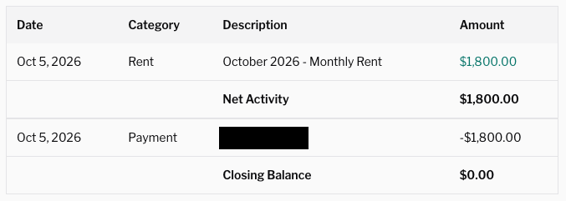
My payment looks smaller than my full rent. Why?
Usually one of three reasons:
- If you pay your Nomad fee monthly, that fee now posts as its own single line on the 1st instead of being blended into your rent — so you see it as a separate bill rather than a smaller rent number.
- If your resident paid only part of the rent, you'll see the part they paid plus Nomad covering the rest. Together they add up to your full rent.
- If this is the first full month of your lease, Leasing Fee (if applicable) and Platform fees will be deducted from the rent
What is the "Net Activity" on the statement?
Net Activity is all of the credits and debits from the statement period. Commonly you will see Rent and Pet Rent as credits. You may also see debits such as your Platform Fee. Once all of the activity is totaled, that should match the Payment which is the funds released to the owner.
What is the "Closing Balance"?
Closing balance is the balance on your account after all of the activity and the payment has been released to you. Most often this will be $0 as it means all funds owed to you have been paid for the period.
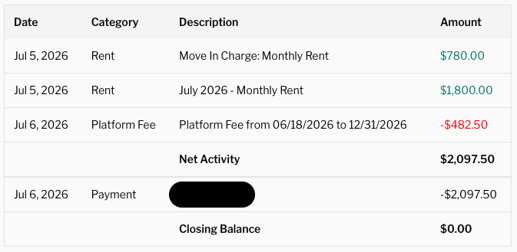
Where can I see a full breakdown of my payment or ledger?
Contact our support team and we'll send you an itemized breakdown from your ledger — your rent, any fees, and any adjustments — so you can see exactly how your payment was calculated.
Why did I get two payments in one month?
The first is likely your guaranteed rent (look at the category). The second is a smaller amount — such as your pet rent, utilities, or passthrough charges — sent once your resident has actually paid it. Your pet rent & additional fees aren't guaranteed through GR (just base rent); it's paid when your resident pays.
Still have a question about your statement?
We're always happy to provide more clarity about your account or Earning Statement. Please reach out to our support team (support@nomadlease.com) with any additional questions.