![Nomad_Mark_Light_Green-2.png]](https://help.nomadlease.com/hs-fs/hubfs/Nomad_Mark_Light_Green-2.png?height=40&name=Nomad_Mark_Light_Green-2.png)
Review the Getting Started-Agent Led Showings Guide for more detailed information on this process.
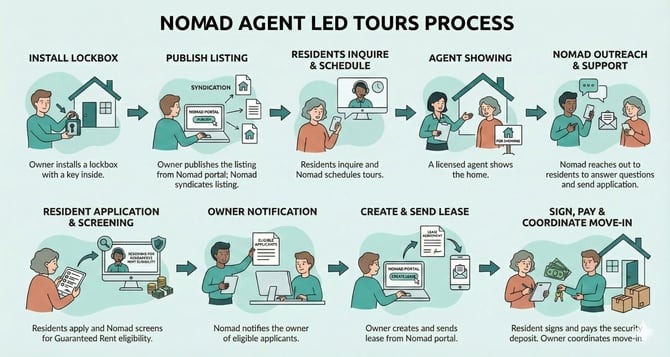
Step 1. The owner confirms the lockbox or keypad code under the Nomad portal’s My Listing → Access Details. Ensure all additional specifics needed to successfully show the property are included.
Step 2. The owner publishes the listing in the Nomad Portal under My Listing. Nomad then syndicates the listing to 30+ rental platforms. This increases exposure while consolidating information in your Nomad portal for easy access.
Step 3. After prospects complete a pre-screening, they can schedule a showing through our showing vendor, Showdigs' system. Prospects confirm their showing through a direct link texted to them from Showdigs. This ensures tours are logged and tracked in the system for an agent to meet at the property.
Step 4. A licensed showing agent meets the prospect at the home. The agent helps facilitate access and answers basic questions during the showing. This provides a guided walkthrough experience for the prospect.
Step 5. Nomad conducts post-tour outreach. Nomad follows up with prospects multiple times after each showing, including sharing the application link. Owners can monitor showing feedback in the Nomad Portal under Find Resident.
Step 6. Interested residents apply, and Nomad reviews eligibility. Owners can track progress and application statuses in the Nomad Portal under Find Resident → Applications. Processing time ranges from 0–3 days, depending largely on applicant responsiveness.
Step 7. Nomad notifies the owner when applicants are deemed eligible. Eligible applicant details are available in the Nomad Portal under Applications.
Step 8. The owner confirms lease terms directly with the applicants and generates the lease through the Nomad Portal under Applications. The owner is responsible for contacting applicants directly using their contact information in the Nomad portal. After the owner completes and signs their portion of the lease, the system automatically sends the lease to the selected applicant(s) to complete their portion.
Step 9. Once the lease is signed, Nomad deactivates the listing and ends showings. Residents are instructed to submit the security deposit at signing, and rent is due by the lease start date. The security deposit payment finalizes the resident’s commitment and considers the lease fully executed.
Step 10. Owner and tenant coordinate move-in details directly. Nomad does not facilitate this part of the process.